
PHSKY Payment – Limits and Deposit & Withdrawal Methods
PHSKY payment offers a variety of flexible transaction methods, allowing members to deposit and withdraw funds conveniently through GCash, Maya, GrabPay, bank transfers, and USDT. PHSKY supports different transaction limits to suit each payment method and transaction amount. Learn more about the available payment channels, processing times, and step-by-step instructions to manage your account balance quickly and accurately.
PHSKY payment deposit limits and channels
PHSKY payment offers multiple online deposit channels, allowing members to choose a method that suits the payment account they use. Each method has its own minimum and maximum transaction limits, as detailed below.
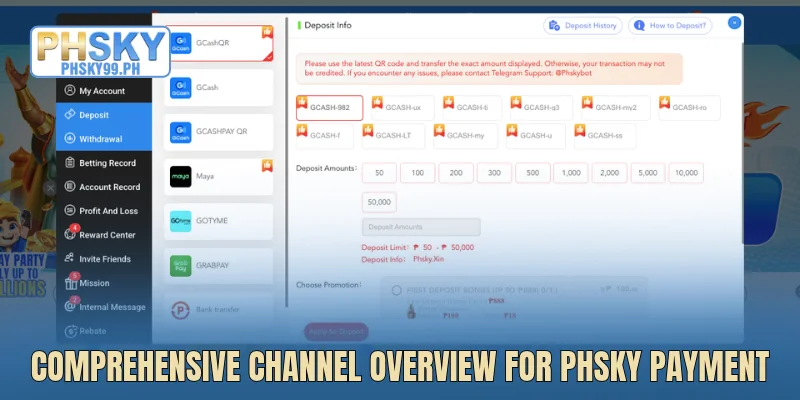
Available transaction channels on the website
PHSKY payment supports various deposit channels, including e-wallets, bank transfers, and USDT (TRC20) cryptocurrency. Members can choose the method that suits their intended deposit amount and check each channel’s minimum and maximum limits before making a transaction.
| Transaction channel | Minimum limit | Maximum limit |
| GCashQR | 50 PHP | 50,000 PHP |
| GCash | 100 PHP | 50,000 PHP |
| GCASHPAY QR | 100 PHP | 50,000 PHP |
| Maya | 50 PHP | 50,000 PHP |
| GOTYME | 100 PHP | 50,000 PHP |
| GRABPAY | 100 PHP | 50,000 PHP |
| Bank Transfer | 1,000 PHP | 50,000 PHP |
| USDT (TRC20) | 100 PHP (1.57 USDT) | 999,999 PHP (15,703.50 USDT) |
How to deposit via QR (GCash QR, GCASHPAY QR)
PHSKY supports QR-code deposits through GCash QR and GCASHPAY QR. Simply select a payment channel, enter the amount, and scan the code to complete the transaction.
- Step 1: Log in to PHSKY, go to Deposit, and select GCash QR or GCASHPAY QR.
- Step 2: Enter an amount between 50 PHP and 50,000 PHP for GCash QR, or between 100 PHP and 50,000 PHP for GCASHPAY QR, then click Apply for Deposit.
- Step 3: Open your e-wallet, scan the QR code, and confirm the transfer for the exact amount displayed.
How to deposit via PHSKY payment using Maya, GOTYME, or GRABPAY
Players can deposit directly through GCash, Maya, GOTYME, or GRABPAY. Each e-wallet has its own transaction limits:
- Step 1: Log in, select Deposit on the PHSKY payment page, and choose your preferred e-wallet.
- Step 2: Enter the amount: GCash supports deposits from 100 PHP to 50,000 PHP, Maya from 50 PHP to 50,000 PHP, and GOTYME and GRABPAY from 100 PHP to 50,000 PHP.
- Step 3: Check the details, confirm the payment, and verify your account balance once the transaction is complete.
3 steps to deposit via bank transfer and USDT on PHSKY
PHSKY payment supports bank transfers and USDT deposits over the TRC20 network. Check the transaction limits and recipient details before proceeding.
- Step 1: Log in, go to Deposit, and select Bank Transfer or USDT (TRC20).
- Step 2: Enter an amount between 1,000 PHP and 50,000 PHP for bank transfers, or between 100 PHP (1.57 USDT) and 999,999 PHP (15,703.50 USDT) for USDT.
- Step 3: Transfer the funds using the displayed details. For USDT, verify the wallet address and ensure that the TRC20 network is selected before confirming the transaction.
PHSKY payment withdrawals
PHSKY payment supports withdrawals through GCash, Maya, and bank accounts with a simple process. Players only need to link their payment details, check the wagering requirements, and enter the amount they wish to withdraw.
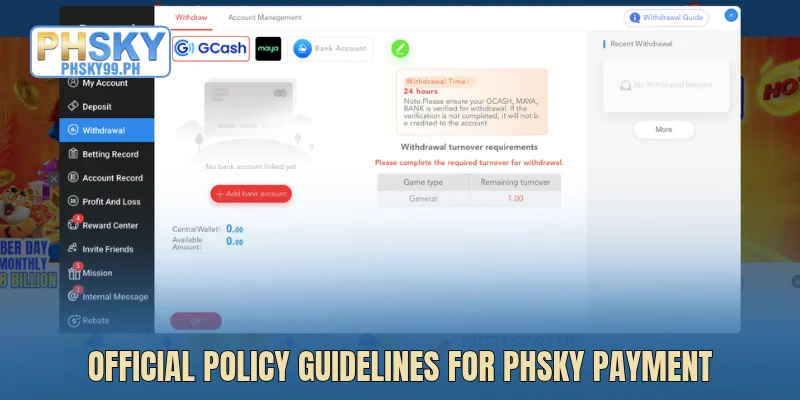
PHSKY withdrawal limits and restrictions
PHSKY sets specific limits for each withdrawal transaction and the number of withdrawals allowed per day. Players must meet the wagering requirements and use a payment account registered in their own name to withdraw funds successfully.
| Criteria | Details |
| Withdrawal channels | GCash, Maya, bank accounts |
| Minimum withdrawal | 100 PHP per transaction |
| Maximum withdrawal | 50,000 PHP per transaction or subject to the limit of each channel |
| Daily withdrawal limit | Up to 3 withdrawals |
| Processing time | Support available 24/7 |
| Account verification | The GCash wallet, Maya wallet, or bank account must be registered in the player’s own name |
| Wagering conditions | All requirements must be met. Remaining Turnover must equal 0.00 before making a withdrawal |
How to withdraw via PHSKY payment using Maya
PHSKY supports direct withdrawals to Maya wallets through a simple process that can be completed on both mobile devices and computers. Players only need to link a wallet registered in their own name, enter a valid amount, and confirm the details to submit a withdrawal request.
- Step 1: Log in, go to Withdrawal, and select Maya on the PHSKY payment page.
- Step 2: Select a verified Maya wallet or add a new wallet.
- Step 3: Enter an amount between 100 PHP and 50,000 PHP, review the details, and click OK to submit the withdrawal request.
Bank withdrawal process
Withdrawing through a bank account allows players to receive payments directly into their registered personal accounts. Before proceeding, make sure the bank name, account number, and account holder’s name are entered correctly to reduce the risk of transaction errors.
- Step 1: Go to Personal Center, select Withdrawal, and click Bank Account.
- Step 2: Select Add bank account to enter the bank name, account number, and account holder’s name if no account has been linked yet.
- Step 3: Enter the withdrawal amount, check that Remaining Turnover = 0.00, and click OK to confirm.
3 steps to withdraw via PHSKY payment using GCash
GCash is one of the withdrawal channels supported by PHSKY payment, making it a convenient option for players who regularly use e-wallets for payments. With just a few steps, you can submit a withdrawal request and track its processing status directly on the platform.
- Step 1: Log in to PHSKY, go to Withdrawal, and select GCash.
- Step 2: Select a linked GCash wallet or click Add wallet to add a wallet registered in your own name.
- Step 3: Enter an amount between 100 PHP and 50,000 PHP, review the details, and click OK to submit the request.
Important notes for using each PHSKY payment channel
When using PHSKY payment, players should pay close attention to transaction details and payment conditions. In particular, carefully verify the receiving account information and promotional requirements before proceeding.

- Always check deposit and withdrawal limits, transaction amounts, and recipient details before confirming a transaction.
- Use e-wallets and bank accounts registered in your own name, and keep the receipt after each transfer.
- When participating in PHSKY bonus, carefully review the bonus terms, wagering requirements, and validity period of each offer.
Conclusion
PHSKY payment offers multiple deposit and withdrawal channels, including GCash, Maya, GOTYME, GRABPAY, bank transfers, and USDT (TRC20). Players should choose a suitable payment method, check the transaction limits, and fulfill all transaction requirements to manage their accounts more conveniently.